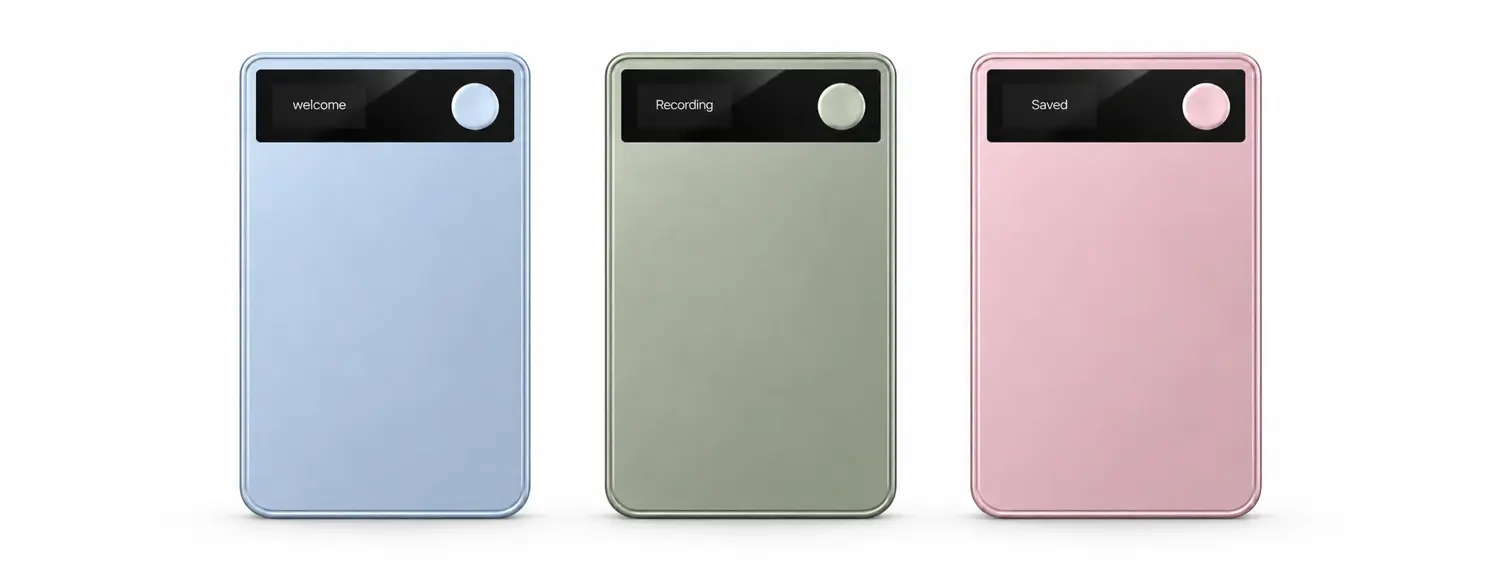
Simple from the first press.
A small display. One recording button. Nothing else to think about.
Meet Atonom Neo
Your conversations, remembered. The follow-up, ready to approve.
A little device that helps you stay present.
A small display. One recording button. Nothing else to think about.
A simple start. A moment bookmarked. Your recording, waiting in the app.
Ice Blue

Press and hold for about a second to start. Hold again to stop and save.
Double-tap while recording to bookmark something you’ll want to return to.
Your recordings transfer when you stop, or when your phone reconnects.
8 hours of continuous recording
12 feet of audio capture range
64 GB of on-device storage

The best part of a conversation is the exchange.
Atonom helps you return to the details, so you can give the moment your attention.

The Atonom app
Go from what was said to what comes next.
Neo captures it. Your Cloud Employee lines up the work.
Start on Neo or use your phone’s microphone. Follow the live transcript in the app and bookmark the moments that matter.
Revisit the transcript, see who said what, and get a summary you can act on. English transcription runs on your phone, even offline after setup.
Hand off account research, follow-ups across channels and CRM updates to your Cloud Employee. Review the plan and approve what moves forward within your company’s rules.
Let’s share the updated proposal before our next check-in.
I’ll review the timeline and send my notes.
Share the updated proposal and compare timelines before the next check-in.
Find context and answer open questions.
Draft the customer and team emails.
Save commitments to the CRM.

“Add the buyers’ feedback to their file, draft a text with the floor plan, and prepare the offer email for my broker.”
Add the buyers’ feedback and property preferences to their client record.
Attach the floor plan and prepare a text you can check and send.
Draft an email to your broker with the selected offer and attachments.

“Log today’s visit, draft a follow-up with the product sheet, and prepare the quote email for my manager.”
Save the requirements, budget and next steps in the CRM.
Include the product sheet and a recap of what you agreed.
Draft a note to your manager with the quote and supporting details.

“Update the deal with these notes, draft a recap for the buyer, and find a time for the technical demo.”
Add the decision makers, requirements and agreed next steps to the opportunity.
Prepare an email with the key decisions and who owns each next step.
Check connected calendars and suggest times for the buyer and technical team.

“Save the customer’s feedback, draft a note to product about the export feature, and plan our next check-in.”
Add the request and what you promised to the customer’s account.
Draft a message with the export request and the customer’s requirements.
Suggest available times and prepare an agenda from the open items.
Connected files & records
Your Cloud Employee draws on your conversations, product documents and customer history to answer questions, draft follow-ups and prepare updates to your connected tools.
The information behind each answer and update.
Product sheets, playbooks and policies.
Account history, contacts and open opportunities.
Decisions, owners and upcoming work.
Atonom for teams
Use it across your team. Recordings, decisions and approved next steps stay in one place, with personal history kept apart.


Your personal history stays yours.
Work follows your company’s rules.
Your personal history stays yours.
Work follows your company’s rules.
Security, at every step
Your connected systems. Enterprise security.
And next steps that wait for your approval.
From everyday recording to a Cloud Employee connected to your business. Choose how much you hand off.
Let AI help you find what matters.
Everything Neo does free, plus
Hand the follow-through to your Cloud Employee.
Everything in Plus, plus
The most room for your Cloud Employee.
Everything in Pro, plus
Every Neo works free with on-device transcription and notes.
A Cloud Employee for everyone. Your devices. Your rules.
Custom
Talk to sales
A device. An app. Your Cloud Employee.
Neo ships in limited numbers. Get in line.
Neo captures your conversations in person, on calls and in meetings. The Atonom app gives you transcripts, bookmarks and summaries. Your Cloud Employee remembers what was said, answers your questions and prepares follow-ups, CRM updates and tasks for you to approve.
Yes. Neo captures audio on its own. Recordings import when it next reconnects to your phone. You can also record directly with your phone’s microphone.
English transcription and speaker separation run on your phone after a one-time model download. Without a plan, recordings stay on your phone. Plus, Pro and Max add cloud processing, and live calls with your Cloud Employee need an internet connection.
Neo is the device: the small recorder that captures your conversations. A Cloud Employee is your AI teammate in the Atonom app. You choose its name and appearance, talk with it on live voice calls and hand it the next steps. Each person’s account has one Cloud Employee.
Atonom proposes next steps for you to review, edit, dismiss or approve. For email and messages, approval opens a prepared draft. You still choose when to press Send. Other approved actions can open your calendar, create a reminder, save a note or open directions.
Business mode lets you choose Personal or Work before recording, subject to your company’s policy. Company rules apply to Work recordings. Joining a company does not move your earlier personal recordings into its workspace. Company-wide device and access controls are available with Enterprise.
Neo is shipping in limited numbers. Get in line on this page and we’ll email you when it’s your turn to buy. Every Neo works free with on-device transcription and notes. Plus is $20/month, Pro is $80/month and Max is $200/month, with 18% off when billed annually. Enterprise has custom pricing.
On-phone transcription is English only and needs a one-time model download. Live Cloud Employee calls need an internet connection. Email actions prepare a draft for you to send. Features vary by platform and setup.


